
Don’t Fall for Fake Apple Purchase Alerts
How Families Can Stay Safe from Phishing Scams
Cybercriminals are constantly finding new ways to trick people into giving away personal and financial information. One of the latest scams targeting families involves fake Apple purchase alerts designed to create panic and pressure people into acting quickly.
Here’s how the scam works — and how you can protect yourself and your family.
How the Scam Works
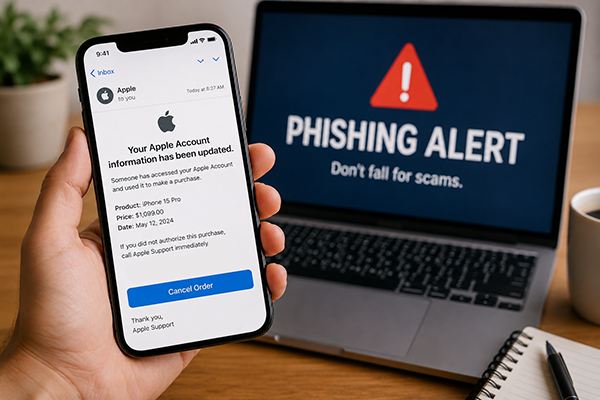
You receive what appears to be a legitimate email from Apple saying:
“Your Apple Account information has been updated.”
The email may claim someone used your account to purchase a new iPhone or another expensive Apple product. It often includes an urgent message telling you to call a phone number immediately if you did not authorize the purchase.
At first glance, the email may look real. It may use Apple logos, branding, and professional formatting. But if you call the number, you are not reaching Apple support — you are speaking with a scammer.
The fake “support representative” may tell you:
- Your Apple account has been hacked
- Your banking information is at risk
- You need to act immediately to stop fraudulent charges
From there, they may try to:
- Steal your banking or credit card information
- Convince you to share passwords or verification codes
- Ask you to install software that gives them remote access to your phone or computer
Once scammers gain access, they can steal money, personal information, or even take control of your accounts.
Why These Scams Work
Phishing scams are successful because they create fear and urgency. When people believe a large purchase was made using their account, they often react emotionally before verifying the information.
According to the Federal Trade Commission (FTC), consumers lost billions of dollars to fraud in recent years, with impersonation and phishing scams among the most common tactics.
Cybercriminals also know that many families rely heavily on Apple devices for banking, shopping, communication, and storing personal photos and information, making Apple-related scams especially effective.
Warning Signs of a Phishing Email
Even realistic-looking emails usually contain clues that something is wrong. Watch for:
- Unexpected purchase notifications
- Pressure to act immediately
- Phone numbers asking you to call support
- Misspellings or awkward grammar
- Generic greetings like “Dear Customer”
- Email addresses that don’t match official Apple domains
- Links that lead to suspicious websites
If something feels off, trust your instincts and verify the message independently.
How to Protect Yourself and Your Family
1. Never Call the Number in a Suspicious Email
If you receive an unexpected alert about your Apple account, do not use the phone number provided in the message.
Instead:
- Open your Apple device settings directly
- Visit Apple’s official website yourself
- Log into your account independently to review recent purchases
2. Slow Down Before You React
Scammers want you to panic. Take a moment to stop and think before clicking links, downloading files, or sharing information.
A legitimate company will not pressure you into immediate action through fear tactics.
3. Never Share Sensitive Information
Apple and legitimate companies will never ask you to provide:
- Passwords
- One-time verification codes
- Full banking information
- Remote access to your device
4. Keep Devices Updated
Software updates often contain important security protections. Keeping phones, tablets, and computers updated can help protect against malware and cyber threats.
5. Talk to Your Family About Online Safety
Children, teens, and older adults are often targeted by phishing scams. Having regular conversations about online safety can help your family recognize warning signs before becoming victims.
What To Do If You Think You Were Scammed
If you believe you interacted with a phishing scam:
- Change your passwords immediately
- Contact your financial institution
- Monitor your accounts for unusual activity
- Run security scans on your devices
- Report the scam to the FTC Report Fraud Page
- Contact Apple Support directly
Tools and Calculators Disclosure:
The information, content, tools, links, articles, calculators, and resources provided on this website are intended for educational and informational purposes only. They are designed to help individuals and families make informed financial decisions but should not be considered financial, legal, tax, investment, or professional advice.
While we strive to provide accurate and up-to-date information, we do not guarantee the completeness, accuracy, reliability, suitability, or availability of any content or third-party materials referenced on this site
Any links to third-party websites, products, services, or applications are provided as a convenience for educational purposes. These external resources are not owned, operated, controlled, endorsed, or guaranteed by the credit union unless explicitly stated as an official product or service offering. The credit union is not responsible for the content, security, availability, or privacy practices of external websites or third-party providers.